I trained Claude to ideate and write emails for my client.
And it’s just as good, if not better, than what I would write.
(Never in a million years did I think I would ever write that sentence)
The emails are written in their voice, pulling from their expertise, and follow their content strategy to attract and convert their ideal customers.
Now, an AI guru would tell you to copy a prompt and use it to get the same results.
That sh*t makes me sick 🤮
Because Claude (or any AI) requires more than a prompt to write like you or generate content ideas for you.
It takes work, months of it, to train Claude to write like you.
Close this article now if you’re after a quick hack you can implement this morning. I don’t deal in hacks, but in systems that actually work.
If you’re ready to build something the right way, keep reading.
How to Create an AI Email Writer
Here’s the process I used to train Claude to ideate and write my client’s email newsletters.
Step 1: Write the Emails Yourself
Spend 6-8 months ideating and writing the emails yourself.
(I told you this wasn’t a hack.)
This will help you to establish your voice and style and share enough of your expertise to train Claude to think like you.
Your brand voice will not be captured effectively in a brand strategy document. Sure, you’ll get some adjectives, dos and don’ts, and maybe even some word choices, but your voice is nuanced.
How you say one thing is not how you say something else.
And no brand strategist is going to capture every single nuance, word choice, or formatting choice.
AI needs examples to understand the nuance that makes up your brand voice.
Writing 6-8 months' worth of emails provides nuance, helps you understand what makes a good email, and lets you test topics and formats before settling on your email format.
Use a ghostwriter, content creator, or a brand strategist (hint, hint) to write those emails if you don’t see yourself as a good writer. The goal is to have samples.
Step 2: Document Your Brand
AI needs context to ideate and write like you—more than just past emails.
It needs to know you, your brand, your message, the goals of your email (and your marketing overall), how you think, and those unique points of view that should come out in every single piece of content you create.
This is accomplished by creating a series of markdown (md) files:
- Tone of Voice
- About Our Brand
- Brand Strategy
- Marketing Strategy
- Content Strategy
The easiest way to create these files: export your brand strategy, marketing strategy, content strategy, and tone of voice documents as markdown files.
Then ask Claude to clean up the files to minimize reading time but maximize its understanding.
Don’t have a brand, marketing, or content strategy? We create all of that in our
BrandOS+ package.
Step 3: Upload Files to Claude
Once you’ve created 6-8 months of email newsletters and have the 5 markdown files listed above, it's time to feed that information to Claude.
Here’s how:
- Go to claude.com/download. Download the app on your computer.
- You must have a Pro account ($20/month). I pay for the $100/month plan.
- Open the app. Click on the Cowork tab at the top between Chat & Code.
- Select a folder from your computer.
- Always select “Opus 4.6” for complex tasks. It’s the smart model.
- Set up your Cowork folder with the following structure:
Next, drag your files into the following folders:
- 5 markdown files → About Me
- 6-8 months of email newsletters → Inputs
That will help Claude know where to look when it comes time to create your email newsletters.
Step 4: Generate Email Ideas
You now have everything you need to have Claude generate email ideas for you.
I recommend creating a skill within Claude to streamline this process (and eliminate the need for you to have a perfectly crafted prompt each time).
Copy the prompt below into your Claude CoWork Project. Once the questions are answered, Claude will produce a finished, ready-to-use idea-generator skill built around your newsletter.
Then, when it’s time to generate email ideas, simply type /email-ideas (or whatever you name the skill) and ask Claude for email ideas.
I want you to build me a newsletter idea-generator skill. It should take a short brief from me each time and return a batch of numbered email ideas — each with a subject line, preview text, a short outline, and a note on what input it needs before it can be written. It should never repeat angles I've already used, and every batch should mix a few distinct types of content.
Use my answers below to fill in the idea-generator template. Where I leave something blank or vague, make a sensible suggestion and flag it so I can correct it. Don't start generating email ideas yet — just build the skill.
1. The basics
Your name and role:
Your business, in one line:
Newsletter name:
What's the single call to action every issue drives toward? (book a call, reply, sign up, download, etc.)
2. The reader
Who reads this? (job title, seniority, company type/size)
What do they care about, and what are they skeptical of?
3. Your back catalogue (so it doesn't repeat itself)
Roughly how many issues have you sent?
Where do past issues live? (connected docs / a running list file / nowhere yet)
If you can, paste a list of the last 10–20 issues: number, title, and the angle each took.
4. Content categories (the variety engine)
Think about the 2–4 distinct jobs your content does. A common split is: (A) change how readers think about your space, (B) show what's possible / what you enable, (C) practical how-to. What are yours? Name each one and describe in a sentence what it covers.
If you're not sure, tell me your topic and I'll propose categories for you to approve.
5. Subject line style (most important for quality)
How long should subject lines be? (word limit)
Describe the register you want in plain terms (e.g. "plain and literal, no wordplay" vs. "curious and punchy").
Paste 2–3 subject lines you'd be happy to send (the right register).
Paste 2–3 subject lines that make you cringe (the wrong register).
6. Preview text and outlines
What should preview text do — tell readers what they'll learn, or tease them in? Paste 1–2 examples you like if you have them.
How long should outlines be? (e.g. 4–6 bullets)
7. Source of fresh material and dependencies
Where do new stories, data, or opinions come from? (a subject-matter expert, clients, your own projects)
Who or what is the input source each idea should flag when it needs material? (e.g. "needs a quote from [name]" or "needs a recent client example")
8. Batch and brief
How many ideas do you want per batch? (e.g. 8–12)
What will you typically tell me in your brief each time? (last issue number, recent topics, focus for the batch, anything else)
Once you have my answers, build the full skill and show it to me. Ask me to confirm before we use it to generate real ideas.
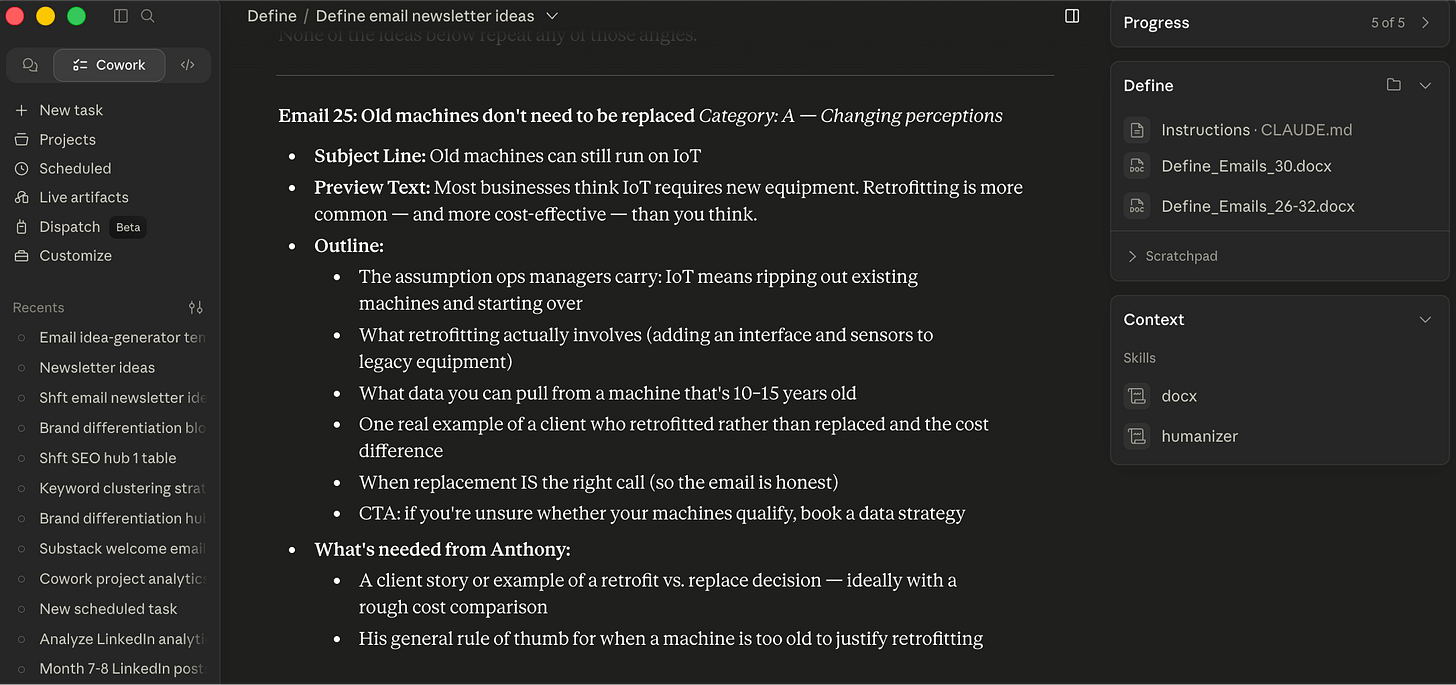
I recommend having Claude generate 12 or 20 email ideas, even if you only write 4 per month. Remember, this is still AI. You will get some duplicate or sh*t ideas. I always ask for 20 and find 4 I want it to write.
You’ll get an output that looks something like this (with 20 ideas):
Step 5: Choose 4 to Write Drafts
It’s finally time to have Claude write the email drafts for you!
(Again, I told you this wasn’t a hack but a repeatable system)
Look through the email ideas Claude gave you and pick 4 you want to write.
Again, I recommend creating a skill within Claude to streamline this process (and eliminate the need for you to have a perfectly crafted prompt each time).
Copy the prompt below into your Claude CoWork Project. Once the questions are answered, Claude will produce a finished, ready-to-use email-writer skill built around your newsletter.
Then, when it’s time to write your emails, simply type /email-writer (or whatever you name the skill) and ask Claude to write the 4 emails you chose.
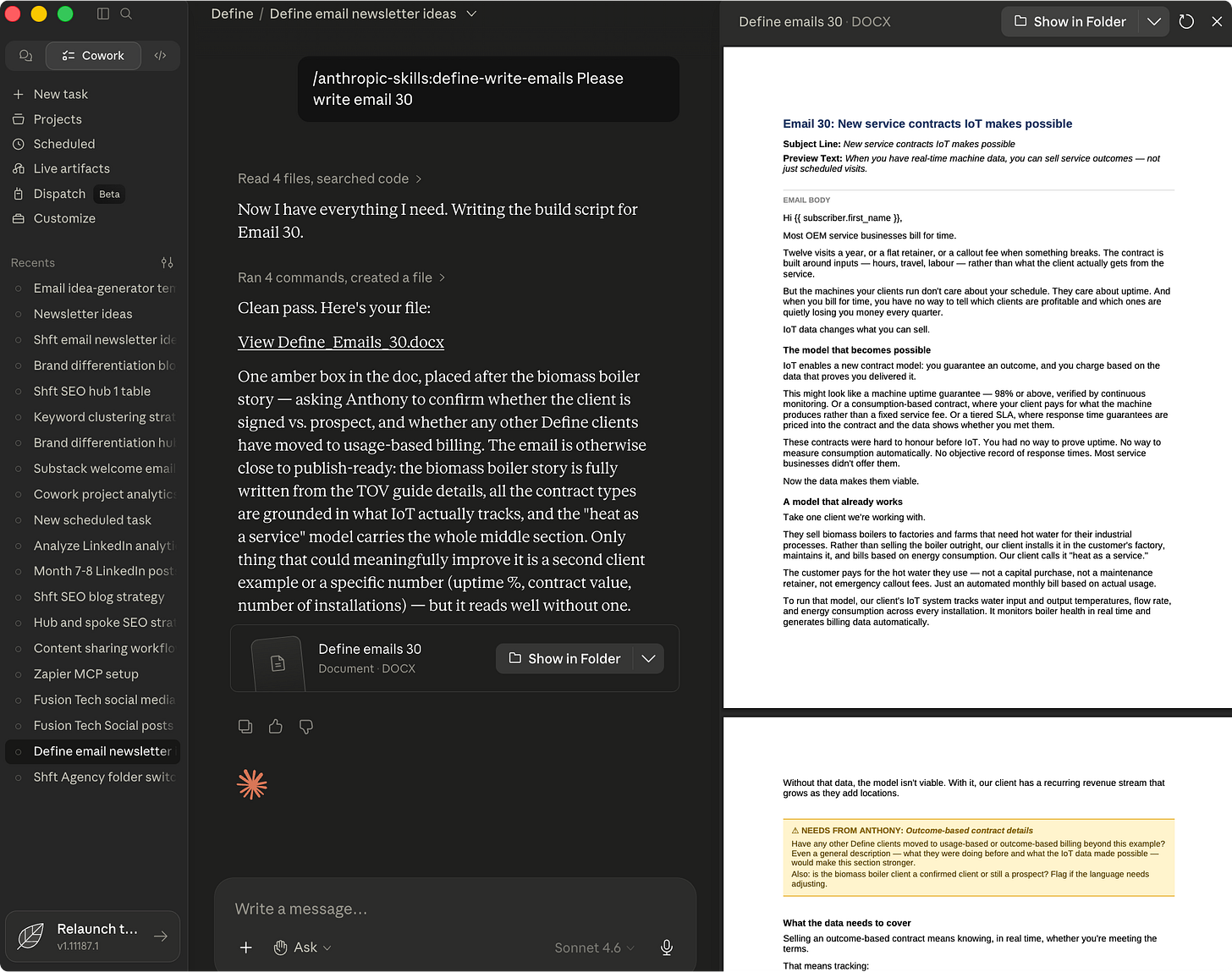
I want you to build me a newsletter email-writer skill. It takes a batch of approved email ideas and writes the full emails as a single Word document, in my voice, with a page break between each email. Wherever an email needs something only a human can supply — a client story, a real number, a specific opinion — it should leave a highlighted box explaining exactly what's needed and why, placed right where that content belongs.
Use my answers below to fill in the email-writer template. Where I leave something blank or vague, make a sensible suggestion and flag it so I can correct it. Don't write any emails yet — just build the skill.
1. The basics
Your name and business:
Newsletter name:
How many emails per batch? (e.g. 4)
File-name prefix for the Word doc (e.g. "Acme" → Acme_Emails_33-36.docx):
2. Your voice rules — the most important part
Paste your tone-of-voice / style guide if you have one. If you don't, answer these so I can build one:
Where do your voice rules live? (a doc I can search, a file, or nowhere yet)
Structure: How does a typical email open? How many sections? How do you handle headers and the closing?
Stories/examples: Do you use client or real-world examples? If so, how do you introduce and write them?
Sentences/word choice: Any preferred words, banned words, tense rules, sentence openings to avoid, or hedging words you always cut?
Bullets: Do you use them? Any rules for how they're set up and closed?
Closers and CTA: How does an email end? Paste your exact call-to-action wording and how the closing line should work.
Paste 1–2 finalized emails you're proud of — these teach the voice better than any rule.
3. Subject line and preview text
If an idea arrives without a subject line, what's your rule for writing one? (length, register)
Same for preview text — what should it do?
4. What gets written vs. flagged for a human
What can be written confidently from existing knowledge of your business?
What should always be flagged for a human to supply? (named client, real numbers, a specific person's opinion, deal status, technical specifics, etc.)
Who is the "input source" the flags should address? (yourself, a subject-matter expert, a client)
5. Document formatting
Brand font and body text size (e.g. Arial, 11pt):
Highlight-box color for the "needs input" flags (e.g. amber):
Any other formatting preferences, or should I use clean defaults (1-inch margins, thin grey dividers, bold section headers)?
Once you have my answers, build the full skill and show it to me. Ask me to confirm before we use it to write real emails.
You’ll get an output that looks something like this with your written emails:
The output will only be as good as the markdown files and sample emails you provided Claude. If it doesn’t sound like you, it’s time to make some changes.
Step 6: Edit and Update Docs
Never, ever, EVER take the AI output as the final version.
Read through each one and make as many edits as necessary to make it sound like you.
Now, if you did step 2 correctly, the output should be very, very close to your voice and expertise. But remember, this is AI. It does make mistakes, hallucinates, and needs to be reminded of what to do.
I’ve only needed to make minor edits or additions to my client’s emails, but I still make changes.
When you’re done editing each email, feed it back into Claude to update your tone-of-voice MD file.
Again, I recommend creating a skill to streamline this process.
Drop the prompt below into Claude Cowork, answer the questions, and it will create a skill you can use to update your tone-of-voice guide after editing your emails.
I want you to build me a skill that learns from my edits and keeps my tone-of-voice guide up to date.
Here's the loop I'm trying to close: emails get drafted for me, I edit them before they go out, and right now those edits live and die in each email. I want a skill that reads the draft and my final version side by side, notices how I consistently change things, and folds those patterns back into my voice guide — so the next batch of drafts already sounds more like me.
Use my answers below to build the skill. Don't analyze any emails yet — just build the skill and show it to me. Where I'm vague, make a sensible default and flag it.
How the skill should work
When I run it, it should follow these steps:
1. Gather the inputs. It needs three things: the original drafts, my edited/final versions, and my current tone-of-voice guide. Pull from wherever I tell you these live (see my answers below). If I only give it final versions with no original to compare against, it should say so and stop — it can't learn from edits it can't see.
2. Diff each email. For every email, compare the draft to my final version and list what actually changed: words swapped, sentences cut or added, structure reordered, tone shifted, punctuation and formatting changed, openings and closings rewritten.
3. Separate patterns from one-offs — this is the most important rule. A single edit is not a rule. Before changing my guide, it must see the same kind of change repeated across multiple emails. Sort every change into:
Patterns (the same move appears 2+ times) → candidates for the guide
One-offs (happened once, context-specific) → note them, don't change the guide
Factual or topical fixes (corrected a number, changed a client name) → ignore, these aren't voice
It should never invent a rule from a single edit, and it should tell me how many times it saw a pattern before proposing it.
4. Check against my existing guide. For each pattern, decide whether it's a brand-new rule, a refinement of a rule I already have, or a contradiction of an existing rule. If it contradicts something already in the guide, it must flag that and ask me before overwriting — never silently reverse my own stated rules.
5. Propose updates, then wait. Before touching the guide, show me a short changelog: each proposed addition or change, the evidence behind it (which emails, how many times), and where it would go. I approve, reject, or edit. Only after I approve does it update the guide.
6. Update the guide in place. Keep my guide's existing structure, headings, and format. Add or refine rules without reformatting the whole thing. Preserve my wording style — it's my guide, not a rewrite.
7. Leave a trail. After updating, give me a 2–3 sentence summary: what it changed, what patterns it's "watching" (seen once, not yet a rule), and anything it noticed but couldn't classify.
Questions for me before you build it
1. Where do the original drafts live? (a folder, a connected doc, tracked-changes inside the same file, or I'll paste them in each time)
2. Where do my final/edited versions live? (same options — and tell me if you can pull both from one tracked-changes document)
3. Where is my tone-of-voice guide? (file path or doc name — this is the file the skill updates)
4. How many emails should it see a pattern in before proposing a rule? (default: 2. Higher = more cautious.)
5. Are there kinds of edits I want it to always ignore? (e.g. factual corrections, links, client-specific details, legal/compliance changes)
6. Do you want it to keep a running "watch list" of patterns it's seen once but not yet promoted to a rule, so they accumulate across sessions? (default: yes)
7. Should it ever update the guide automatically, or always show me the changelog and wait for approval first? (default: always wait)
Once you have my answers, build the full skill and show it to me. Ask me to confirm before we use it on real emails.
There won’t be an official output after running this skill.
It will go through and update your tone-of-voice document to better reflect your writing and give you a synopsis of what it changed.
Create Your Email AI Writer
That’s it!
If you follow those 6 steps, you’ll have 3 Claude skills that help you:
- Ideate topics for your email newsletter
- Write the emails
- Update your tone of voice guide after editing the emails
Follow that process for the next 6-8 months. Claude will eventually get to the point where you don’t need to edit the emails anymore.
That’s the beauty of a BrandOS.
It’s not just about creating positioning and messaging. It helps you create operating systems for all of your marketing, content, and sales efforts.
Want an AI writer for your brand? Book a call to learn more about our BrandOS with AI Writer add-on.
We’ll do the hard work of creating an AI system that can write your emails, blog posts, and social media content that sound like you and draw on your expertise (not generic AI slop).
Until next week,
#SassyJason out.
✌🏼